Archive

Project write up


Proposal

Having an app dedicated to university students can evolve the way we view the student experience. What if students can click on a building and see every bit of information they need about professors, ratings, interactive 3D map that lets them travel though the building, view classrooms and class numbers, view which student are inside the classroom at a given time, and even view chat rooms that were started within that specific class? All of this information is available through the registrar each and every semester along with utilizing GPS technology in our smart phones. Given the fact GPS technology is so advanced now, we’re able to locate our friends and family with one tap in our smart phone. The technology is so advanced now, you could pin point a persons exact location in feet.

Scope

When we meet and engage in new friends around campus, some basic questions we ask each other to start a conversation:
– What class do you have next?
–  Do you like Professor Smith?
– Who’s in your class?
– Do you have a lot of homework?

We can utilize this technology, allowing students to activate their underground community profile to simulate their exact position and location throughout the whole university. Students will have the ability to log into our RMU Underground APP using their credentials provided by the university when a student first registers into RMU as a student.

Privacy is the most concern or issues students may have with the app. Therefore, once logged in, they will be given the security options to hide detailed information from other users. They can hide their class schedule, GPS location, and personal information such as the degree they’re enrolled in so that others may not intrude this information.

The home page or main page of the app will feature an overhead 3D aerial map of the whole university. The map will display the buildings and landmarks which can be activated or accessed by one tap of the finger. Within each building, users are able to explore and retrieve important information that we struggle to find each and every semester.

The ability to view professor ratings without relying on third party websites such as ratemyprofessor.com will enhance the student experience since many students are investing thousands of dollars each semester for a great education.

The RMU Underground app will have many features that allows students interact with other students in more ways than one getting them involved within the department of student life such as the career center, parent and family programs, student civic engagement and even social student activities. RMU has numerous weekday activities such as movie nights, concerts, bonfires, dances, and even karaoke nights that help engage in student activity. With utilizing this app, information can be provided through the underground network allowing students to easily access the information for that specific day or even the upcoming days.

FLOW slides


Our strategy includes designing a washer and dryer that does not require the user’s action to proceed from washing to drying, design a product that saves time, energy and recycles water. Among our goals is stressing the importance of sustainability and convincing a manufacturer that this product is going to be marketable and fill a significant portion of demand. By clearly illustrating these characteristics our main goal would be to persuade a company representative that our product would be a successful commercial item that would be worth manufacturing.

For achieving that goal we must design a clever, simple and recognizable logo that conveys the ideas mentioned above: ease of use, economy, environmental sensitivity, and of course less time spent doing laundry. Our website layout should be simple, clean, easy and pleasurable to navigate. It will have to display in detail our product’s technical characteristics. We will use HTML, CSS, photography, animation, and copy to clearly illustrate the product’s advantages and specifications.

The user should be able to understand with clarity why our washing/drying machine is better than a simple washer/dryer combo and why it would be profitable to mass produce it.  A manufacturer representative should be able to navigate and see the different parts of the product, each subsystem separately and everything put together, using an intuitive and efficient interface.


Proposal

            Do you like penguins? Have you ever wish you could catch snowballs with them? The “Catch the Snowballs” game is a fun gaming app that is about a penguin that catches snowballs. In the game, the penguin earns five­ points for each snowball caught. The penguin also loses points for the snowballs he drops and after 10 snowballs consecutively dropped, the user loses the game. The best part of this app is that the user does not only have to play this game only on their smart phone but can also be projected on any surface, such as a wall or floor, and use their smart phone in the same fashion as a game console controller.

To be able to project the game however, the user must have a projector already on their phone called the Pico Projector. This projector would apply the use of an image protector but on a handheld device such as a smartphone, personal digital assistant, tablet, or digital camera. There are different kinds of Pico Projectors too. Depending on what projector the user has depends on the size of the screen when it is projected. It also either uses LED light or laser light source depending on which projector the user has. This is a new technology that people are starting to use and will make mobile gaming more enjoyable for users.

The purpose of this game is to entertain and take our users another step closer in the realm of technology and attract people with its friendly and cartoon looking appearance. Our goal is to target towards people who enjoy playing mobile gaming apps on their phone and also play games on video game consoles. We believe that our app is able to bring both those worlds together. We intend to attract as many people with the look and feel of our app by working on the branding and the layout of the app. The content and pages on our app will also be very informative by showing and having users how to play the game in an easy and enjoyable manner.

The strategy of the Catch the Snowballs game is to target people of all ages, from children who can operate a smart phone to full-grown adults that still enjoy playing video games. We want to sell the app to people that enjoy mobile gaming and video games on gaming consoles. We will have the homepage be the “Play” page where the user can either press play to start the game or press the “help” button if the user needs help. We will also have a “Difficulty” page that allows the user to choose from easy, medium, hard, or expert. Another page we will have will be the “Game Style” page, which is where the user plays the actual game. This page will include ways to move the penguin in the game and also a place that shows how many points the user is earning. Lastly we will have a page that will be either the “Winner/Loser” page that appears after the user is finished playing the game and shows if they won or lost.

We want to have a clean, simple, and user-friendly app along with a fun, lively, and intuitive layout like the games Bubble Shooter and Angry Birds. We will entertain and inform users with the information, images, and other media where appropriate. We will follow branding standards set up by our company.

Link to Flow Chart:
http://www.vakohar.com/Images/snowballsflowchart.pdf

Link to Timeline:
http://www.vakohar.com/Images/timeline.pdf

Link to App Comps:
http://www.vakohar.com/Images/sbappcomp1.pdf
http://www.vakohar.com/Images/sbappcomp2.pdf
http://www.vakohar.com/Images/sbappcomp3.pdf
http://www.vakohar.com/Images/sbappcomp4.pdf
http://www.vakohar.com/Images/sbappcomp5.pdf
http://www.vakohar.com/Images/sbappcomp6.pdf
http://www.vakohar.com/Images/sbappcomp7.pdf
http://www.vakohar.com/Images/sbappcomp8.pdf
http://www.vakohar.com/Images/projectedview.pdf

Final Project Time Frame and Deadlines

  • 4/3-10:  Brainstorming, ideas, sketches
  • 4/10-14:  Work on the first 2 ideas, Interactive Book & Causality. Result: Interactive Book. Start writing prose. Establish scope, strategy.
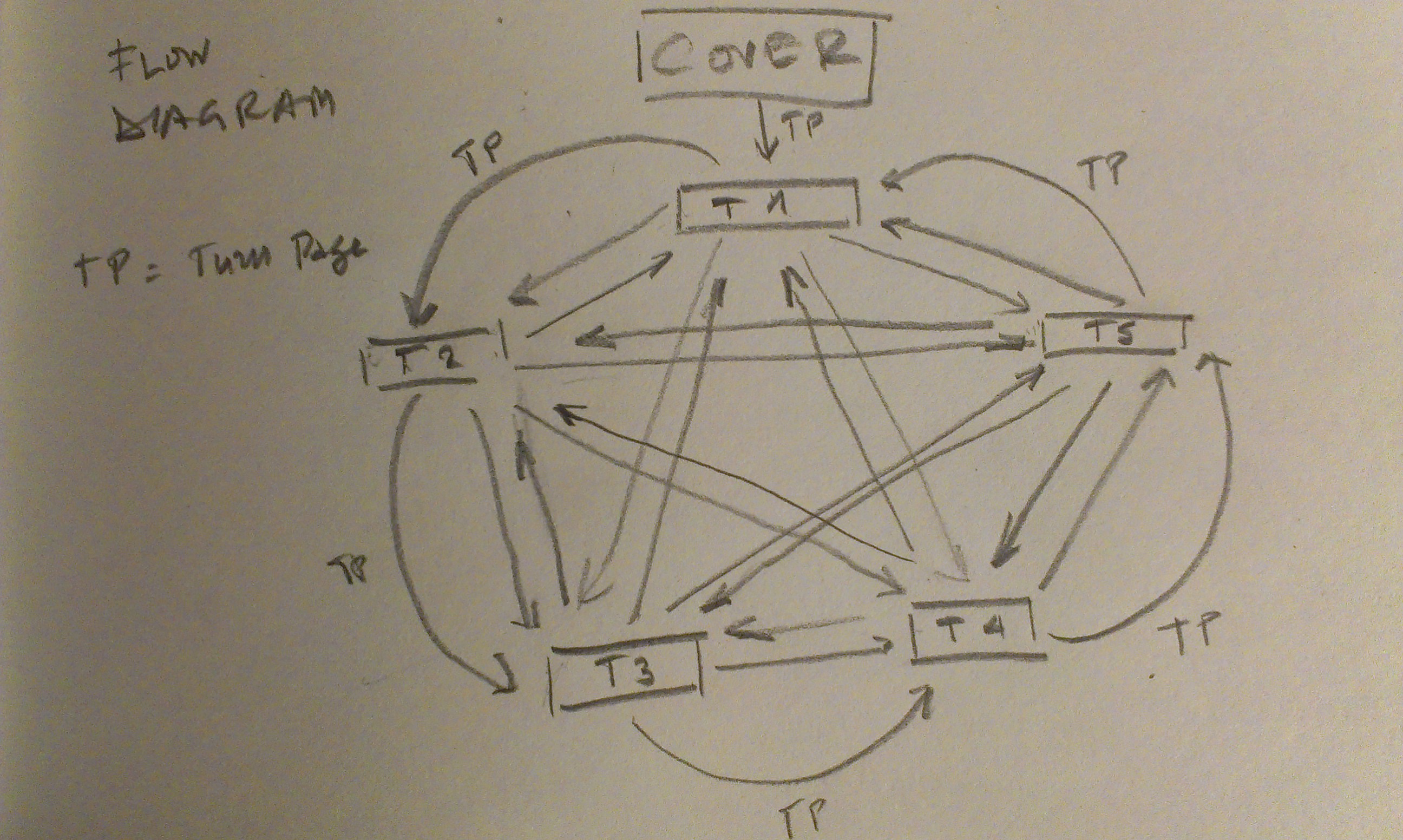
  • 4/11-17:  By the end of the day have flow diagram. Start designing the book in InDesign and Flash while working on the narrative.
  • 4/20:  Finish the prose. Work on interactivity and controls.
  • 4/21 Debug, seek feedback, and work on final version.
  • 4/24 Presentation and critique.

Strategy

The idea behind Palindrome is to make an interactive book by creating a piece of experimental narrative that is non-linear. Depending on the options provided and the reader’s choices, the story changes and the book becomes a parallel narration of possible events.  Beyond the interactive form Palindrome must be still a reading that is capable of giving a good idea of how chance and choices could affect life and create different outcomes and potentially timelines, in a universe where time would be non-linear and many different timelines could coexist.

Scope

Palindrome will be designed for any electronic device that can run flash and will rely on:

  • Text and illustrations
  • Non-linear narrative
  • Interactive elements and animation created with InDesign and Adobe Flash
  • Variable content
  • Links in the text that allow the user to switch between timelines


Notes40002

  • Eveline Clouds Cause and effect Blood Spiral Flow Diagram

Flow-Diagram


AR Live Sportscaster App


Strategy

Many times going to a stadium to watch a game, especially being an occasional frequenter of sports events, I wish I had a sportscaster right next to me: one that could provide information, player background, statistics, time, and various interesting facts about the game and the teams.

Live Sportscaster App (LSA) aims to cover that need, which is providing simple information about the players and the game during a sports event, on demand. It will also be capable of recording images and giving instant replays when desired. LSA ultimately aims to make the viewing of a sports event overall, a more enjoyable and complete experience.

Scope

The app will be designed for AR devices such as Google Glass but there could also be a smartphone version. The features and functions of LSA will be:

  • Displaying player names and information.
  • Providing player game and season stats.
  • Recording video and providing instant replays, on demand.
  • Showing team stats and information.
  • Giving game stats and information.


.LSA5 LSA4 LSA3 LSA2 LSA1 Personas1 Flow-Diagram Personas

Strategy


Many times going to a stadium to watch a game, especially being an occasional frequenter of sports events, I wish I had a sportscaster right next to me: one that could provide information, player background, statistics, time, and various interesting facts about the game and the teams.


The Live Sportscaster App (LSA) aims to covering that need, which is providing simple to complex information about the players and the game during a sports event, on demand. It will also be capable of recording images and give instant replays when desired. LSA ultimately aims to making the viewing of a sports event a more enjoyable and complete experience, overall.


Scope


The app will be designed for AR devices such as Google Glass but there could also be a smartphone version. Some of the features and functions of LSA will be:


  • Displaying player names.
  • Providing player season and career stats.
  • Recording video and providing instant replays, on demand.
  • Providing team stats and season standings.
  • Giving game stats and times.
  • Calculating and displaying distances.

Personas Flow-Diagram


The Chive is an app meant for procrastination. It is a gallery of photo albums with catchy title names, such as, FLBP (future lower back problems) which features pictures of girls or “Daily Morning Awesomeness”, which is an ode to photoshops less professional applications. The app is very entertaining and it’s something I look at to take a break from the stress of daily life. Its usability is fairly simple. The footer has tabs for “latest”, “shuffle”, “videos”, “top rated”, and “more”. This allows for seamless procrastination. I find myself unable to put it down because of the sensory overload so readily available. The functionality of the app is faulty at times. When scrolling through albums it sometimes sticks while your finger continues down, most likely due to loading time for the thumbnail picture on each album. The videos have a hard time loading without a perfect wifi network. The interface, while fairly simple to use, was not completely designed for a mobile device. Some of the album titles are too long for the width of the phone and it is impossible to see the entire album name without going to a desktop computer. Aesthetically, I like the green highlighted over a dark industrial background, but the gradient is too heavy and the logo seems meaningless in its design. thechive.com

The app I use regularly is the Monster Mobile Application.  The usability function, the interface, the design, and the aesthetics of the application are very important and help to make this app one of the better apps for job searching.

The user-friendly advantage makes job searching easy for the average-employable human being.  More importantly, the creation of this app gives its users an on-the-go option as you can now search for jobs out in public or in the privacy of your home.  The app is also user friendly based on the labeling of each page, very basic, as my seven year old was able to navigate with simple task.

The functionality of the mobile application is to make life easier.  Years ago, job searching was an all day thing.  Get up early, eat a good breakfast and head-out into the world to gather applications.  It was an even longer process to go home and proceed with filling them out, being sure to answer all questions clearly and careful not to make a mistake, attach a resume so that you could head out the following morning to deliver your completed applications back to the company.  Years later, the process became a little easier as folks were able to complete applications online.  Today, with the mobile Monster application, it is as simple as setting up an account, uploading a resume, search for your job of choice and hitting the submit button.

The design of the application is pretty simple.  There are a couple ways in which the user can search for jobs as well as the wonderful feature of emailing its users based on searches that he or she made during previous interactions.  These searches also populate into an email that the app sends daily.

The aesthetics of the app are very clean and the color palette is held to 4 colors, purple, white, black and a hint of orange.  The color purple is an excellent choice as through research I found that it means seeking spiritual fulfillment, it is also calming which helps if you have an overly anxious user searching for a job.  The horizontal layout of each page is consistent throughout the app and each link only takes you as far as one more page, which forces its users to go back to the main page, keeping any confusion down.

Overall, the usability function, the design, and the aesthetics of the application are very important and help to make this app one of the better apps for job searching.  No matter if you are a college graduate, a high school student or a 60-year-old retiree looking for a job, the Monster mobile app is very easy to use.  The emails you receive as an active user are also great as they help the user stay on top of any new possible jobs.


Tumblr’s mobile app functions much in the same way that their site does, which is very specific and well known among Tumblr users. Tumblr makes use of a monochromatic color scheme, making all buttons, backgrounds and links a variation of blue. Navigation is simple as the app uses infinite scroll. Users can like or reblog from each photo with one tap or long press from the dashboard button. He or she can proceed to the previous poster’s blog from each post as well. Further navigation can be done from the nav bar at the base of the app. Users can sift through tags from the tag page, and see personal stats, reblogs and likes, and find users from the account page. To post he or she can press the new post button, and a menu is brought up where the user can choose from a text, photo, quote, link, chat or video post. To reload or refresh any page, all the user must do is swipe down from the top of the smart phone, or if they would like to return to the top of the queue, double tap the button for whichever page they are on. The app is aesthetically clean and relatively simple, which accents Tumblr’s ease of use. For a 4.5 star app as Tumblr is rated by 10,500 users, it is need of repair. Often glitch ridden, users are frequently frustrated with the app. The dashboard often freezes up, sending the user to the top of the page, which becomes frustrating with infinite scroll, as he or she is not able to get to the point that they previously left off. Gif’s do not load correctly often times, which in many cases causes the app to slow down, crash, and in the worst case lock up the screen, causing the user to restart their phone and waste battery life. In a scenario where the user frequents both the site and the app, he or she will notice that with increased use from Tumblr’s site, the app will fail to recognize any posts that have been reblogged or liked until the app has been completely shut down multiple times. Other common reviews show that users have issues with loading past the blue screen and slow scrolling. All of these issues are somewhat minor, and if resolved the app would attract more users to tumblr on both the site and app.

The Manga Reader created and operated by Ice Age Apps, targets a very specific demographic. People who enjoy reading anime would highly enjoy this app, because it provides an endless amount of different genres of manga series. This application is user friendly and provides readers with easy access to their favorite mangas right at the their fingertips.

This application functions smoothly and effectively, providing users with instant contact information, in which they will assist with any possible questions users may need answered. Also this app offers advertising to join their team to do translation work. Each issue needs translated from Japanese into English and they offer possible jobs for users who are even more into manga than just average readers. Manga Reader rarely has a time period where their app runs slow, or crashes randomly. They offer a search bar at the top of the home screen incase users know exactly what they are looking for. Other than that the navigation is very diverse users can search through categories, top choices for male and female, or even just search through the entire list of mangas organized alphabetically.

The interface provides any user to have complete customizable options, which is the Favorites button. This part of the app is where users have stored their favorite mangas, which can be deleted if the user would change his or her mind later on. Within Favorites, any series, within the users top selections, will alert the user with a notification on the mobile device that a new chapter has been release and for which manga it is for. The interface is well created specifically for users to have a great environment to read from.

The design of the Manga Reader App is very simple and clean. The use of black, white, and grey allows for a very easy feel. They chose to use a highlight color of a light blue, which shows where the user is within the app. This allows the user to never be confused where they is which is a smart decision when thinking about usability and design together. The layout is simple with a blue banner across the top with the title of the page you are viewing. This also helps with the user navigation. The choice of type applies to the design also, due to the simple sans serif.

Aesthetically the app does not focus around design but more along the lines of function. Ice Age Apps focused more on the text to get the message across, in order for users to not get distracted with images. It seems they were aiming to get users to go straight to what they were looking for. This functionally aesthetic app provides easy to read type and well thought out navigation.

One important feature that would benefit this app would be within the download page. Each series should have a group which contains each new chapter that the user would chose to download, because as of now each new chapter downloaded is in order and different series intermix in a long list of type. This new feature would allow for users to have an easier time going into their downloads and finding the specific issue they would like to read.